
The Collective - When One Claude Becomes Many: Part 3 of The Claude Code Chronicles

ℹ️
Disclaimer: I am not affiliated with, employed by, or sponsored by Anthropic. I am a paying Claude Pro subscriber and receive no compensation or endorsement for mentioning Claude in this article. All opinions and experiences shared are my own.
I looked at my screen. Two terminals, side by side. Both running Claude Code. Same moment in time.
Left terminal: Working on performance optimizations (Issue #100) Right terminal: Fixing dark mode styling (Issue #98)
Different problems. Different branches. Different contexts.
Same memory.
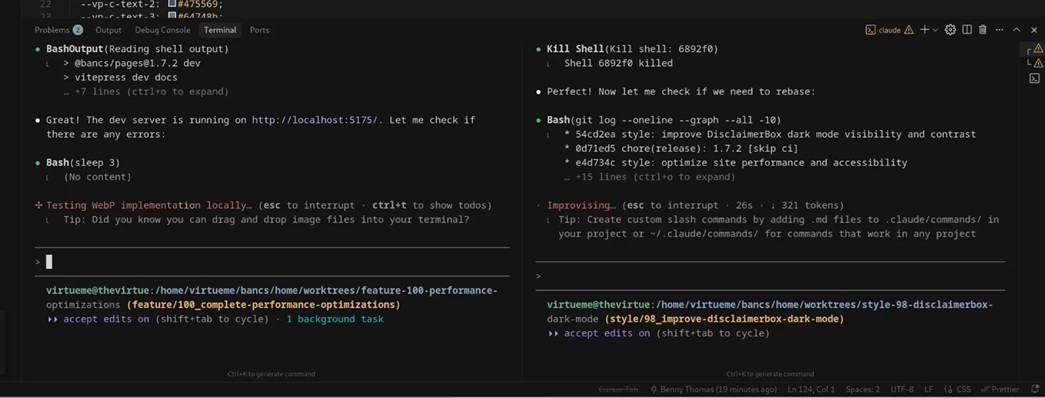
That's when it hit me: I'm not running Claude Code sessions anymore. I'm running a distributed AI collective.
The Discovery You've Been Building Toward
In the last two posts, you learned:
- Post 1: GitHub Issues create persistent memory (the stalactite principle)
- Post 2: The 6-step workflow turns ephemeral conversations into production code
But there's one more piece I haven't told you yet.
Those GitHub Issues don't just persist across time—they persist across instances. Multiple Claude Code sessions can read the same issues. Work on different tasks simultaneously. Share knowledge through a common memory layer.
The catch? You're the coordinator. But the collective remembers everything.
This is where solo development transforms into something else entirely.
Welcome to the Collective
Here's how I used to work: One thing at a time. If I switched tasks, I'd lose context. Come back hours later? Spend 10 minutes remembering where I was. Everything was serial. One task, then the next, then the next.
Now? I've got multiple terminals running Claude Code. Each one's working on a different task. Each one reads its GitHub Issue for context. And here's the thing—they're all pulling from the same knowledge base.
GitHub Issues aren't just task tracking anymore. They're shared memory.
How the Collective Works
Think of it like the Borg from Star Trek—except less terrifying and you're in control.
Each Claude Code instance works independently on its own task. But they all read from the same place: your GitHub Issues. When one instance discovers something, you document it in the issue. Later, when another instance needs that knowledge, you tell it to read that issue. The knowledge transfers.
Real example from my work:
I was working on performance optimizations in one terminal (Instance A, Issue #100). One of the remaining tasks was implementing security headers—PageSpeed Insights flags missing headers as both a security and performance issue. I hit a wall: X-Frame-Options doesn't work when set via HTML meta tags—it must be set at the server level. This cost me 20 minutes of debugging and reading MDN docs.
Instance A documented this in Issue #100: "❌ Tried: meta tag approach. ❌ Why it failed: Browser security model requires HTTP header. ✅ Solution: Configure in server/CDN."
Three hours later, I'm in a different terminal (Instance B) working on a separate security issue. I tell Claude to reference Issue #100 to see how I handled headers before. It reads the issue, sees the documented failure and solution, and avoids the meta tag mistake. No re-debugging. No re-reading MDN. The collective already learned this lesson.
What one instance discovers, all instances can access. That 20-minute debugging session gets documented once, saves time repeatedly.
What Makes This Actually Work
Four things:
1. Persistent Memory - Knowledge sits in GitHub Issues, available whenever you need it
2. Shared Context - All instances read from the same place
3. Documented Discovery - When one instance learns something, you capture it for the others
4. You Coordinate - You decide which terminal does what. The instances don't talk to each other—they talk to you.
Here's the thing people miss: The "collective" isn't the Claude instances magically synchronizing. It's GitHub Issues acting as shared memory. You're the conductor. The issues are the sheet music. The Claude instances play their parts.
The Collective Gets Smarter
You know how it usually goes: Fix a bug. Maybe write it down. Probably forget the details. Six months later, hit the same issue and spend another 20 minutes figuring it out.
With this approach, when Instance A fixes a bug, I have it document everything in the issue. Not just "fixed bug" but "tried X, failed because Y, solution is Z." Six months later, Instance B reads that issue and already knows the solution.
The collective remembers what you document. And it gets more useful over time—more patterns, more lessons, more interconnected knowledge that actually sticks around.
The Ultimate Example: Issue #31
Remember the stalactite principle from Post 1? Small drops, substantial formations.
Here's what that looks like when you scale it up.
I'd just finished a React4XP migration (different project, similar workflow). I asked Claude Code: "What needs to be done to fully modernize this codebase?"
Then: "Please create an issue for this."
One sentence.
What Claude Code created: Issue #31
Not a task. Not a project. A complete 8-10 week modernization roadmap:
- Master roadmap tracking the entire initiative
- 47 specific problems identified across 8 categories
- 14 linked child issues created automatically
- 4-tier priority system
- 4-phase execution strategy (Foundation → Architecture → Quality → Cleanup)
- Effort estimates: 18-35 focused sessions
- Success metrics with before/after states:
- Architecture: 32% → 100% properly structured
- Testing: 0% → 70%+ coverage
- Security: 48 XSS risks → all addressed
- Bundle size: baseline → 20%+ reduction
What I gave Claude Code: "Please create an issue for this"
What Claude Code gave me: A complete project plan I definitely wasn't going to create myself.
The reality of executing it? This required the smallest possible batches. The scope was so large that if I wasn't careful, Claude would overstep—trying to commit and push without consent, retrying solutions that didn't work, wandering outside the current batch. The roadmap was brilliant. Executing it meant constant vigilance to keep Claude focused on the immediate task, not the entire vision.
How I Actually Work Now
Here's my typical day with the collective:
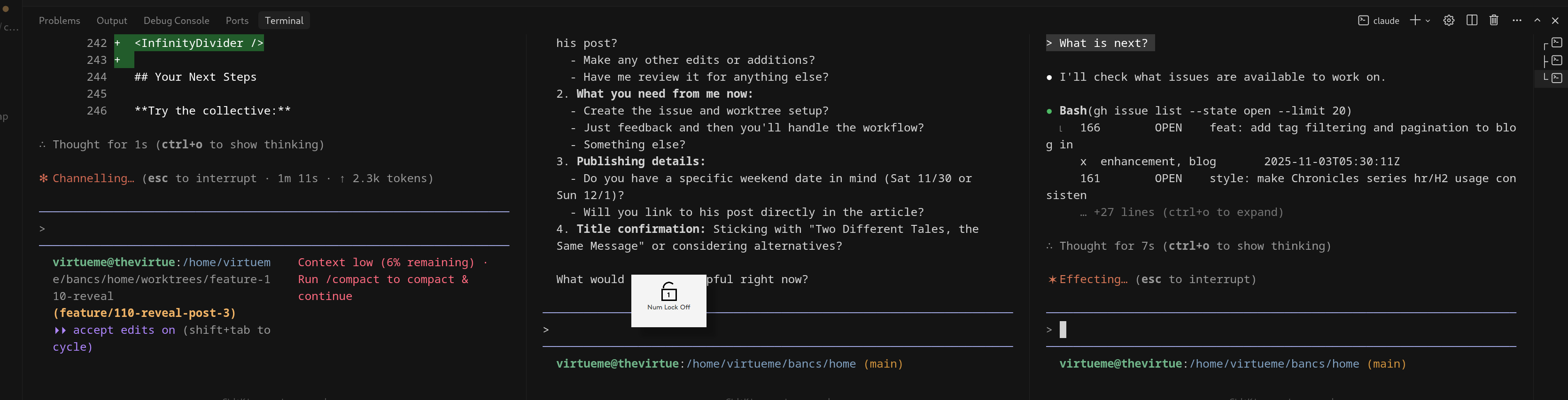
Morning (9 AM): I open three terminals. Terminal 1 and 2 are workers—one handles architecture refactoring, the other tackles a production bug. Terminal 3 is my advisor—I use it to discuss strategy, review solutions, analyze issues, and spot improvements. Not doing implementation, just thinking.
Late morning (11 AM): The architecture refactor hits a wall. I ask Terminal 3: "Review the approach in Issue #X. What am I missing?" It reads the issue, spots a dependency I overlooked. Terminal 2 finishes the bug fix. I merge it, then Terminal 2 picks up dark mode styling.
Afternoon (2 PM): Back to Terminal 1 with the architecture solution. Before I implement, I run it by Terminal 3: "Does this approach make sense given our constraints?" It catches a potential problem. I adjust. Terminal 1 continues with the better approach.
Next day: Three terminals still open—two mid-progress workers, one advisor ready to discuss whatever I need. Claude reads the issues, rebuilds context. No "where was I?" The collective remembers what I documented.
This is how it evolved: Started with two terminals doing work. Realized I needed a third for meta-level thinking—strategy, review, problem-solving. Two workers + one advisor = the sweet spot for me.
What Actually Changed
Let's be clear about the transformation.
Before, I worked on one thing at a time. Context lived in my head. I avoided documentation because it felt like extra work. Switching contexts meant losing progress. Complex projects were overwhelming.
Now, I work on 2-3 things in parallel. Context lives in GitHub Issues where all instances can read it. Documentation happens as I work because I'm having Claude update issues anyway. Switching contexts means telling Claude to read an issue. Complex projects get structured roadmaps (like Issue #31).
Solo developer with finite time and limited working memory → Distributed AI team with persistent memory and parallel work streams.
That's the shift.
How to Activate Your Collective
The mechanics: For clean parallelism, each instance should work on its own branch. I use git worktrees for this—they let you have multiple branches checked out simultaneously in different directories. When you start a new feature, create a worktree with its own branch. Each terminal works in its own worktree. No branch switching. No stashing. Clean separation.
Starting simple? You CAN run two instances on the same branch if one is just exploring/reading while the other does active work. But once both are making changes, you need separate branches to avoid conflicts.
The workflow:
- Two terminals: Open Claude Code in two terminals on different tasks
- Create issues: Let Claude Code create issues for both
- Separate branches: Each terminal works on its own branch (use worktrees for clean isolation)
- Work in parallel: Switch between them as needed
- Context via issues: Each instance rebuilds context by reading its GitHub Issue
As you get comfortable:
- Add a third terminal for exploration
- Use one for feature work, one for bug fixes, one for documentation
- Let the collective grow organically
The beauty: The coordination is lightweight—track 2-3 terminals, reference issues when needed. The heavy lifting (persistent memory, context retention) happens in GitHub Issues.
Your Actual Role Here
Let's be clear: You're not watching magical AI synchronization. You're running the show.
You manage:
- Which terminal works on which issue
- Keeping terminals on separate branches (worktrees help)
- Telling Claude when to reference other issues for context
- Making sure terminals work on different parts of the code
- Tracking which terminal is mid-task and which is ready for new work
The collective handles:
- Storing everything in GitHub Issues
- Rebuilding context when Claude reads an issue
- Making discoveries available across sessions
The instances don't coordinate with each other. They coordinate through you. You're conducting the orchestra, not watching it conduct itself.
When NOT to Use This
Let's be honest about the limits. This approach isn't always the answer:
Don't use multiple instances when:
Single simple task - If it fits in one session, don't overcomplicate it. Opening three terminals for a one-line bug fix is theater, not productivity.
Tight coupling between tasks - If Task A must complete before Task B can start, parallel instances don't help. Sequential work should be sequential.
You're still learning the basics - Master the single-instance workflow first (Posts 1 & 2). Add parallelism when the single workflow feels natural.
Working on the same files - Multiple instances editing the same file creates merge conflicts. Keep instances working on different areas of the codebase.
Before you parallelize, ask Claude:
Don't just assume multiple terminals is the answer. Ask Claude Code first:
- "Is parallel work the best strategy for these issues?"
- "Which issue should I start with?"
- "Can Issue #X and Issue #Y be worked on simultaneously without rebase conflicts?"
Claude can spot dependencies and file conflicts you might miss. And once you start working: Don't add more than the issue requires. Scope creep is easy when momentum builds. Stick to what the issue actually asks for.
The gotcha I learned the hard way: I tried running four instances once, all doing implementation work. Terminals everywhere. Issues flying. It felt productive—until I realized I'd created three merge conflicts and forgotten which terminal was working on what. Two worker instances is ideal for starting. Three works when one is advisory (strategy/review), not implementation. Four+ doing actual work is chaos.
The less obvious problem: This workflow makes progress feel incredibly fast. Which is great—until you forget to slow down and review. Bad prompts lead to bad algorithms. Bad code from one terminal can spread if you're not careful. The speed can trick you into thinking everything's perfect when you need to pause, review, and clean up. Take breaks. Review the code. Don't let the momentum carry bad decisions forward.
Your Next Steps
Try the collective:
- Open two terminals
- Start Claude Code in each
- Work on different issues
- Switch between them freely
- Notice how each instance maintains context by reading GitHub Issues
Share your experience:
- How many instances are you running?
- What problems are you parallelizing?
- What surprised you about the collective?
Where This Leaves You
You started this series with water running off—Claude Code was brilliant but nothing stuck. Now you've got:
- Post 1: Persistent memory through GitHub Issues
- Post 2: A complete workflow from issue to merged PR
- Post 3: Multiple sessions sharing that same persistent memory
The transformation is complete. You went from solo developer fighting context limits to running a distributed AI collective with persistent, shared memory.
Will this work for everyone? No. Some developers prefer single-session work. Some projects don't need parallelism. And that's fine.
But if you've been frustrated by context limits, lost knowledge between sessions, or the cognitive load of juggling multiple tasks—this is the solution I wish I'd found sooner.
Try two terminals. See if the collective changes how you work.
Attribution: This blog post was co-written with Claude (Chat for ideation and outline, Code for assembly and refinement). The experiences, insights, and creative direction are human; the execution and polish are collaborative.